


When it comes to creating websites, WordPress is one platform that has consistently reigned supreme in the world of content management systems. With over two decades of dominance, the universal appeal of this ever-growing platform is undeniable. If you’re considering migrating from Drupal to WordPress, now is the right time to dive into the dynamic ecosystem of WordPress.
From flexibility to user-friendliness, discover why migration from Drupal site to WordPress isn’t just a move but a leap toward a future-proof digital presence.
So, let’s start with a brief overview of these two CMS platforms before checking out the compelling reasons why you should consider Drupal to WordPress migration.
Overview of Drupal and WordPress
Both Drupal and WordPress have distinct strengths, attracting diverse users based on their project requirements, technical expertise, and desired level of customization. Below is a brief overview of both these platforms.
About Drupal
Drupal is a robust open-source CMS for complex and highly customizable websites. It empowers developers and site administrators to create dynamic digital experiences tailored to specific needs. Its modular architecture enables you to create varied websites, from personal blogs to enterprise-level websites. Drupal also has a loyal community of contributors who work continuously towards enhancing the features and security of this platform.
About WordPress
WordPress, launched in 2003, has revolutionized web content creation with its user-friendly approach. Initially renowned as a blogging platform, it swiftly transformed into a versatile content management system.

With an extensive range of themes, plugins, and a simple interface, WordPress caters to both novice bloggers and seasoned developers. Its vast popularity stems from its accessibility, enabling anyone to swiftly set up a website or blog without extensive technical know-how.
Seamless Migration from Drupal to WordPress
Achieve a smooth transition and safeguard your data integrity by getting professional migration services. Contact us now to ensure your project is handled with expertise and precision!
Reasons to Migrate From Drupal to WordPress
When considering a migration from Drupal to WordPress, numerous compelling reasons come to the forefront. Below are a few top reasons why Drupal to WordPress conversion could be the best move for your business.
1. Ease of Use
The #1 reason to consider Drupal to WordPress migration is the unparalleled ease of use that WordPress provides. With its intuitive interface and user-friendly dashboard, even non-technical users can create, edit, update, and manage content effortlessly. WordPress’s WYSIWYG editor or visual editor simplifies content creation, eliminating the need for intricate coding.
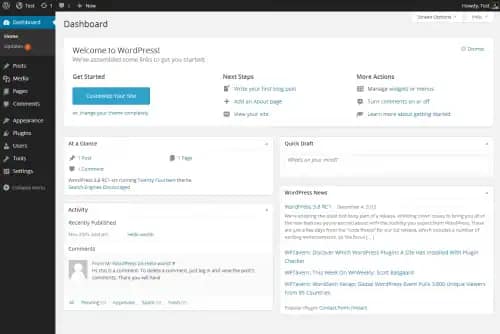
This accessibility also extends to plugin installation, theme customization, and overall site management. Thus ensuring a smoother experience for both beginners and seasoned website administrators.
2. Increased Flexibility
Transitioning from Drupal to WordPress offers increased flexibility, which is a vital consideration for many. WordPress’s extensive array of themes, plugins, and widgets enables easy customization, catering to diverse design and functionality needs. This flexibility empowers users to shape their websites as required without delving into complex coding.
Whether it’s a personal blog, business site, or eCommerce platform, WordPress adapts seamlessly, making it an exceptional choice for those seeking a platform that effortlessly evolves with their vision.
Read: WordPress Outsourcing Services
3. Range of Customization
Switching from Drupal to WordPress also offers an advantage in terms of customization. Unlike Drupal, where technical expertise is required for customizing a website, WordPress provides a user-friendly customization experience.
With a vast selection of themes, plugins, and user-friendly tools, businesses can effortlessly tailor their websites’ appearance and functionality as per needs. This means they can quickly build a unique and professional website without intricate coding, making WordPress a go-to choice for hassle-free customization.
4. SEO-friendly
The surge in demand for Drupal to WordPress migration also stems from a significant reason: SEO-friendly features. WordPress incorporates built-in tools and plugins that simplify the optimization process, such as managing meta tags, generating SEO-friendly URLs, and optimizing content. This makes it a prime choice for businesses eager to enhance their website’s performance.

The SEO features offered by WordPress empower businesses to improve their search engine rankings without delving into technicalities, making WordPress a strategic choice for boosting online visibility and attracting more organic traffic.
Ultimate Guide: How to Migrate a WordPress Site
5. Availability of SEO Plugins
One of WordPress’s standout advantages over Drupal lies in its abundance of SEO plugins, such as the popular Yoast SEO. These plugins are powerful tools to enhance your website’s visibility on search engines.
With intuitive interfaces, they guide you through optimizing your content, meta information, and overall website structure for a better user experience. This accessibility to dedicated SEO plugins empowers even non-technical users to implement effective SEO strategies, giving WordPress a clear edge for those seeking to boost their website’s ranking and traffic.
6. Secure Platform
When switching from Drupal to WordPress, website security is another compelling factor. While no platform is entirely immune to risks, WordPress’s commitment to security makes it an appealing choice for those concerned about safeguarding their websites.
WordPress has made strides in bolstering its security measures over the years. With a large community of developers and consistent updates, vulnerabilities are quickly addressed. Additionally, numerous WordPress security plugins are available to fortify your website against threats.
7. Scalability
WordPress often takes the lead when comparing the scalability of Drupal and WordPress. While both platforms can handle various project sizes, WordPress offers a smoother path to expansion. Its extensive library of plugins and themes allows you to easily adapt your website as it grows.
On the other hand, Drupal’s scalability can sometimes require more technical expertise and effort due to its intricate architecture. WordPress offers a platform that seamlessly grows alongside your needs, making it a smart choice for long-term growth.
Check out: Figma to WordPress Conversion
8. Lower Cost
Opting for a WordPress website over Drupal can lead to notable cost savings. Maintenance expenses for WordPress are generally lower due to its user-friendly nature, which reduces the need for extensive technical assistance.
In fact, WordPress websites have low maintenance costs compared to Drupal. Thus, making it a major draw for businesses and individuals seeking an efficient and budget-friendly website solution.
9. Better Support
The last but not least reason to switch from Drupal to WordPress is the exceptional support that WordPress offers. With a vast and active community, you’re never alone in troubleshooting issues or seeking guidance. Countless forums, tutorials, and resources are readily available. This strong support network extends to plugins and themes, ensuring continuous updates and compatibility.
In comparison, while Drupal also has a community, WordPress’s expansive user base and readily accessible assistance make it a reliable choice for users of all technical backgrounds. This can ultimately ensure minimal downtime, enhancing the overall website performance.
Explore: How Can WordPress White-Label Services Help Scale Agencies
Steps to Migrate from Drupal to WordPress
Migrating from Drupal to WordPress involves several strategic steps to ensure a seamless transition. By following the correct procedures, you can move your content while preserving its integrity and functionality. Here’s a brief overview to guide you through the process.
Step 1: Evaluate Your Current Drupal Site
Begin with a comprehensive evaluation of your existing Drupal site. Analyze the structure, content types, custom fields, post content, and any other critical elements. Understanding these components will help in planning your migration effectively to meet any enterprise needs.
Step 2: Prepare Your New WordPress Environment
Next, set up your new WordPress environment. Choose a reliable hosting provider and establish an FTP connection for smooth data transfer. Ensure that your new WordPress site is configured to accommodate custom post types and custom fields that match the structure of your Drupal website.
Step 3: Export Data from Drupal
With the Drupal database, export your current data. This typically involves creating an export file that contains your site’s default content, including pages, articles, and any custom post types.
Step 4: Import Data into WordPress
Now, import the exported data into your new WordPress site. WordPress offers tools and plugins to facilitate this import process, allowing you to map Drupal content types to WordPress post types and custom fields.
Step 5: Verify and Adjust Content
After importing, verify that all content has been accurately transferred. Verify that post content and custom fields display correctly. Make any necessary adjustments to the layout and format to fit the new platform’s requirements.
Step 6: Configure Additional Features
Finally, configure additional features, such as user details and tracking tools. Integrate Google Analytics to monitor traffic and performance. Ensure that your new site meets all enterprise requirements and is ready to go live.
Once everything is set, it’s time to go live. Monitor the site closely during the initial period, using a progress bar, to ensure everything functions as expected. Address any issues promptly to maintain a smooth user experience.
By following these structured steps, you can successfully migrate from Drupal and set up a well-organized new site on WordPress.
Conclusion
There is no CMS platform better suited to building a business website than WordPress. Drupal to WordPress migration can offer many benefits, as seen above. Not only is WordPress easy to use, but also flexible and scalable. You can also customize it as per needs, plus it offers robust security.
Coming to website optimization, WordPress helps you to optimize your website for both users and search engines alike, thanks to inbuilt SEO tools and the availability of SEO plugins. Moreover, the WordPress community stands as a steadfast ally. Whether it is free resources, tutorials, or professional WordPress support services, assistance is readily available.
Migrating from Drupal to WordPress should be done under the guidance of professionals. Partnering with an expert WordPress agency experienced in Drupal to WordPress migration can ensure a seamless transition, safeguarding against data loss and security vulnerabilities.
If you are considering switching from Drupal to WordPress, get in touch with us. We will help you create a dynamic, user-friendly, search-engine-optimized WordPress website.
FAQs About Drupal to WordPress Site Migration
What is the best approach to migrate from Drupal to WordPress?
To migrate from Drupal to WordPress, it is important to follow best practices such as using the appropriate migration tools, ensuring thorough data mapping, and preparing the new WordPress environment in advance.
How do I handle a Drupal site migration?
During the migration, export your Drupal database, including custom taxonomies and custom fields. Use plugins like FG Drupal to WordPress or WP All Import to efficiently import this data into WordPress.
What should I consider when migrating a Drupal website?
Consider database parameters, navigation menus, and user data. Evaluate security updates and verify that all SEO elements and media files are transferred accurately during the migration process.
How do I set up database drivers for a migration?
Configure the database drivers to ensure compatibility between the systems. Pay attention to any system-specific settings like those in sqlite Drupal databases if applicable.
What are the common issues faced during migration?
Common issues include improper data mapping, missing custom taxonomies, and error messages related to database connectivity. It’s vital to verify the base URL and adjust settings as needed.
Can migration services assist with the transition?
Yes, many services offer tailored solutions that manage the entire process, addressing complex issues such as integrating custom add-ons or managing specific aspects like navigation menus.
What tools are available for facilitating the migration?
Use open source software and tools like WP CLI to streamline tasks, or a file manager to organize imports. These tools can help run importer scripts and manage data effectively.


